What This Calculator Does
The time zone calculator converts a specific date and time from one place to another. You choose the date, type the time (in 12- or 24-hour format), and pick the From and To zones. The result shows the matching moment in the target zone, including the day of the week and the UTC offset — so you know exactly what the clock reads on the other side of the world.
Because you select real locations rather than fixed numbers, daylight saving time is handled automatically for the exact date you enter. The gap between two cities can shift by an hour depending on the season, and the calculator accounts for that.
How to Use It
- Pick the date — day, month, and year.
- Enter the time. Toggle between 12h and 24h format; in 12-hour mode, set AM or PM.
- Choose the From zone — the place your time belongs to.
- Choose the To zone — the place you want to convert into.
- Read the result. Use the ⇄ button to swap the two zones instantly.
The result updates as you type — there is no button to press.
A Worked Example
Say a video call is scheduled for 3:03 PM on Friday, July 31, 2026 in Berlin, and you want to know when that is in New York:
July 31, 2026, 3:03:00 PM (Friday) — Berlin · UTC +02:00
is the same time as
July 31, 2026, 9:03:00 AM (Friday) — New York · UTC −04:00
In late July both cities are on summer time, so the gap is six hours. In January — when neither observes daylight saving — the gap is the same six hours, but the individual offsets change to UTC+01:00 and UTC−05:00.
Time Zones of the World
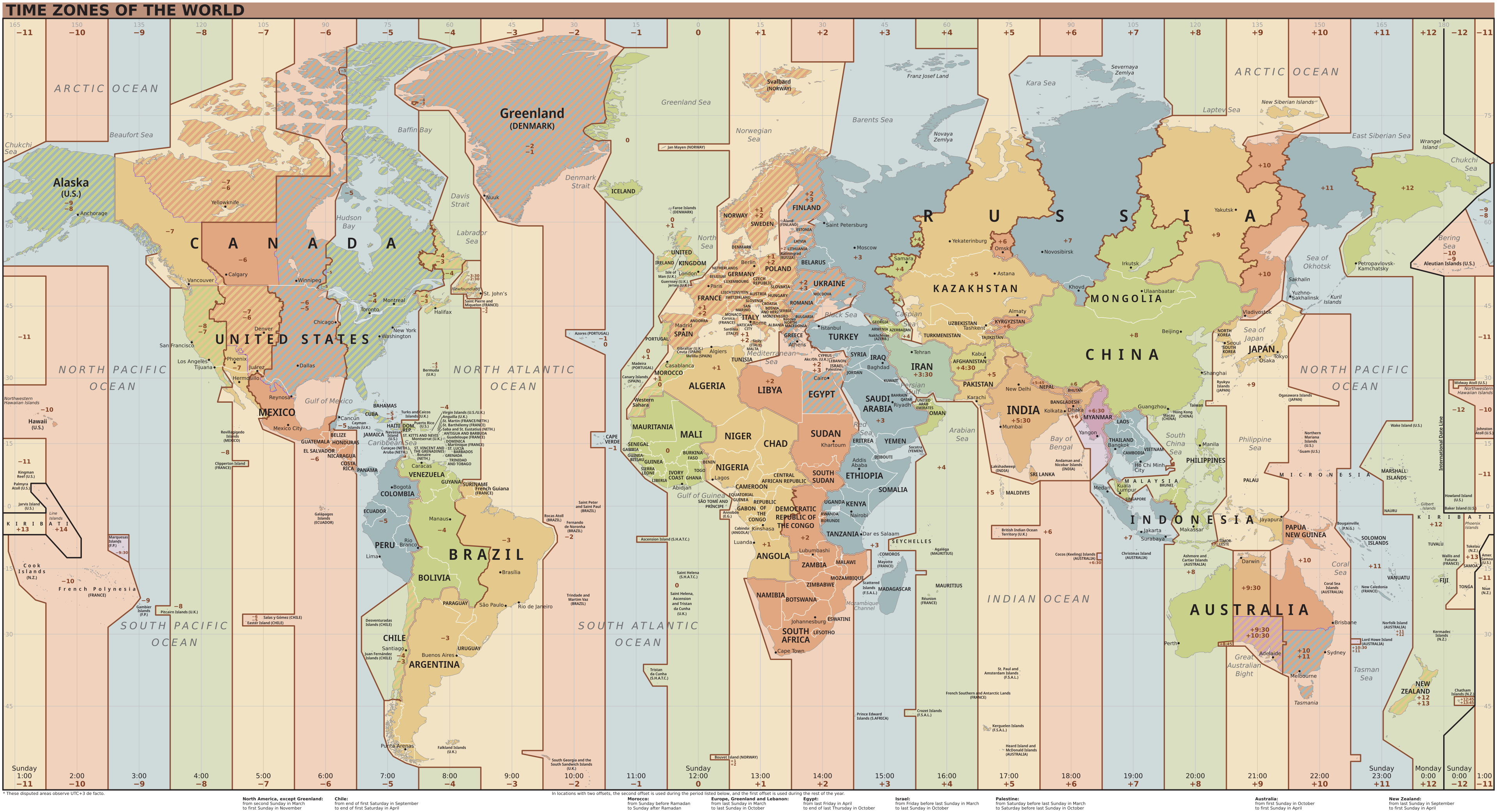
Every zone is defined by its offset from Coordinated Universal Time (UTC), ranging from UTC−12:00 to UTC+14:00. The map below shows the world’s standard-time offsets.
Time Zones in the United States
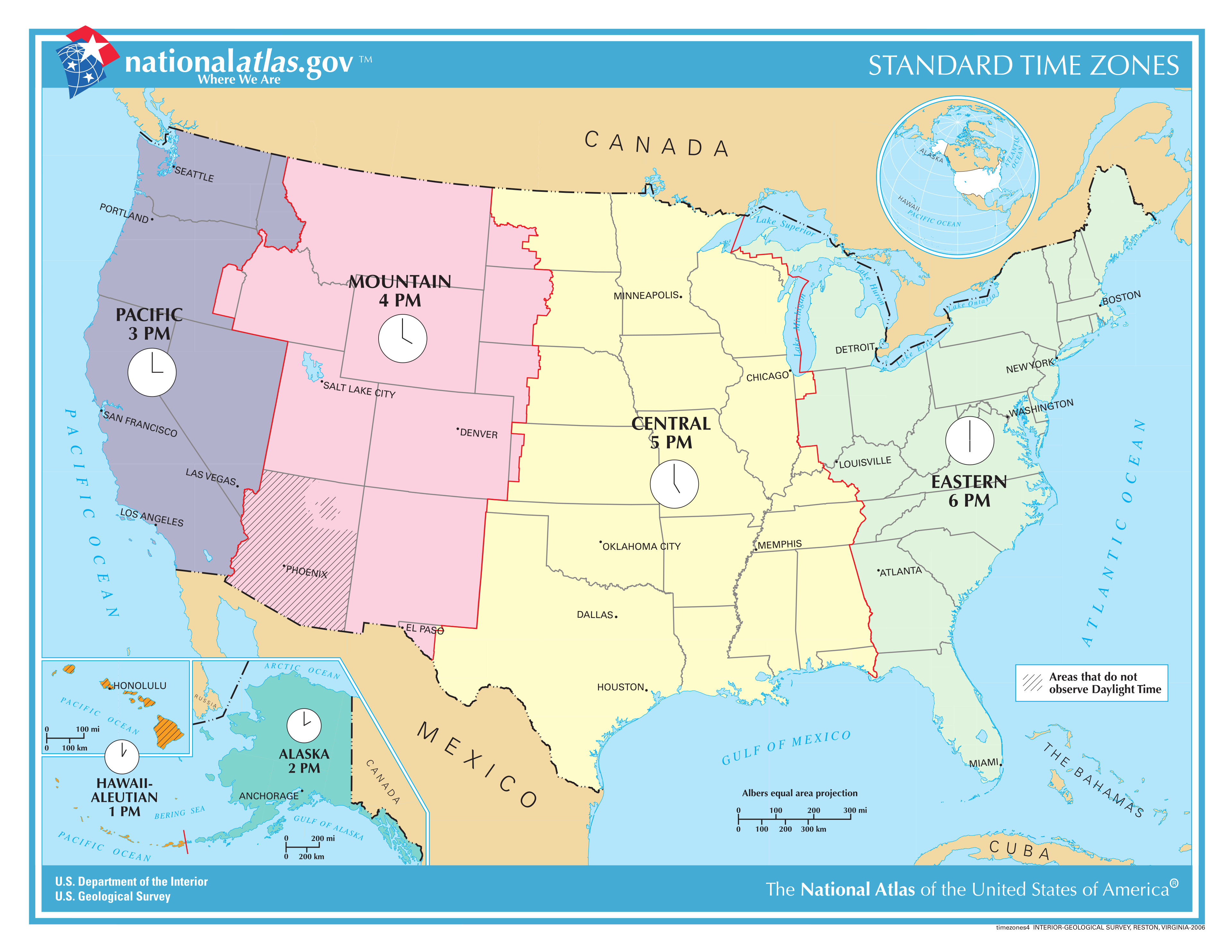
The United States spans six main zones. Most observe daylight saving time from mid-March to early November; Hawaii and most of Arizona stay on standard time all year.
| Zone | Standard offset | Daylight offset | Example city |
|---|---|---|---|
| Eastern (ET) | UTC−05:00 | UTC−04:00 | New York |
| Central (CT) | UTC−06:00 | UTC−05:00 | Chicago |
| Mountain (MT) | UTC−07:00 | UTC−06:00 | Denver |
| Mountain (no DST) | UTC−07:00 | UTC−07:00 | Phoenix |
| Pacific (PT) | UTC−08:00 | UTC−07:00 | Los Angeles |
| Alaska (AKT) | UTC−09:00 | UTC−08:00 | Anchorage |
| Hawaii (HT) | UTC−10:00 | UTC−10:00 | Honolulu |
Daylight Saving Time, Explained
Daylight saving time (DST) shifts the clock forward one hour in spring and back one hour in autumn to make better use of evening daylight. The key thing for conversions is that not everywhere changes on the same day, and some places never change at all.
That is why the calculator asks for a real location instead of a plain offset: only the location knows whether DST was active on the date you chose. Enter a July date and a January date between the same two cities and you may see the offsets — and sometimes the hour gap — come out differently.
Why Use Locations Instead of Fixed Offsets
A fixed offset like “UTC−05:00” is only correct for part of the year in most places. Picking New York rather than UTC−05:00 lets the calculator apply the right rule for your date automatically, so you never have to remember when each region springs forward or falls back.
Sources
- National Institute of Standards and Technology. The Official U.S. Time.
- Wikipedia. Time in the United States.
- Wikipedia. Time zone.